Private beta · iOS

Photograph the note.
Approve the codes.
Watch the money.

Coding and claim follow-up for out-of-network surgeons, done from your phone.

You operate. Operative Note reads the op note, proposes CPT codes with the evidence quoted from your own words, checks Medicare's modifier and bundling rules, emails the package to your billing company, and keeps track of every reply until the money lands.

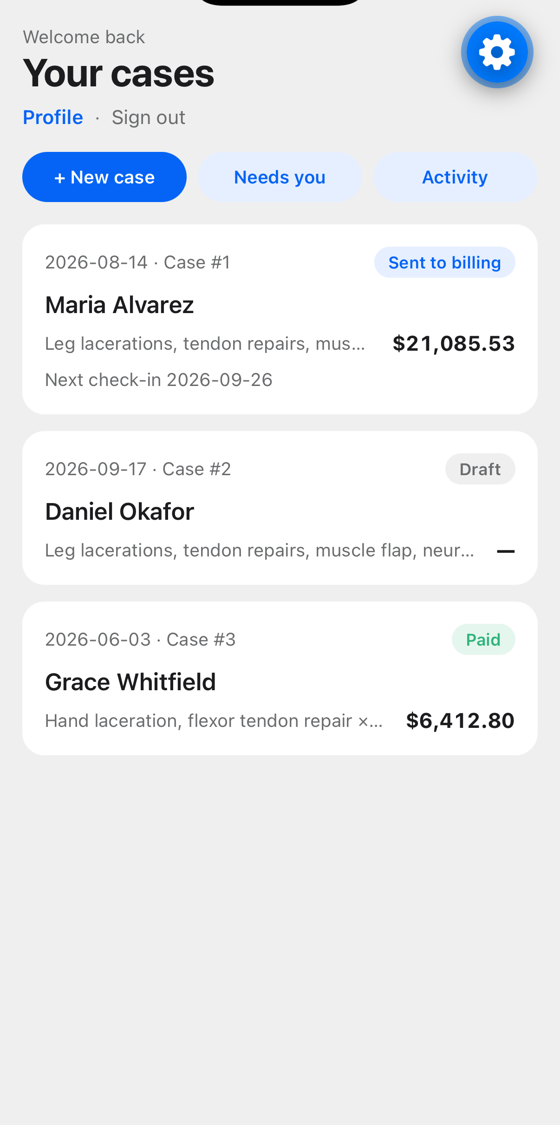
Your cases: each surgery with its status, amount, and next check-in

Three steps per surgery

Under five minutes from the recovery room. No typing codes, no logging into a portal.

1

Photograph

The patient's wristband, every page of the operative note, the insurance card, and any post-op photos. The app reads the wristband for name, date of birth, and MRN, and picks up the hospital from your location.

2

Approve

The AI proposes CPT codes from the note — each with the sentence it came from, the RVUs, the Medicare rate, and what you bill. Swap or remove any code, add modifiers from the list Medicare allows, and settle bundling conflicts with one tap each.

3

Send, then watch

One tap emails the note, card, photos, and codes to your billing company from your own address. From then on the app reads their replies, files them to the case, asks for what's missing, and shows you exactly where each claim stands.

What's in the app

Codes with receipts

Every proposed code shows the words from your note that justify it, its RVUs, the Medicare allowable, and the amount at your multiplier. Tap a code to see alternatives the AI considered, or search for one it didn't.

  • Modifiers offered only where Medicare's own indicators allow them — bilateral, assistant, co-surgeon, 22, digit, global-period, and more — each with a plain-English meaning.
  • Assistant and co-surgeon roles are assigned per code to the surgeons on the case, so the right modifier lands on the right line and billing knows whose claim is whose.
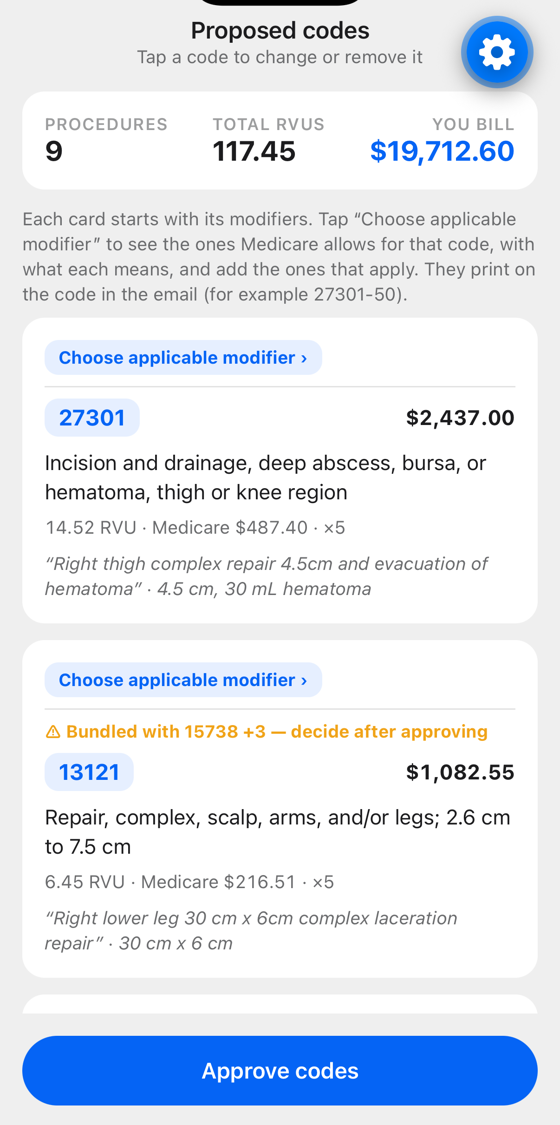
Proposed codes with RVUs, Medicare rate, and the quoted evidence

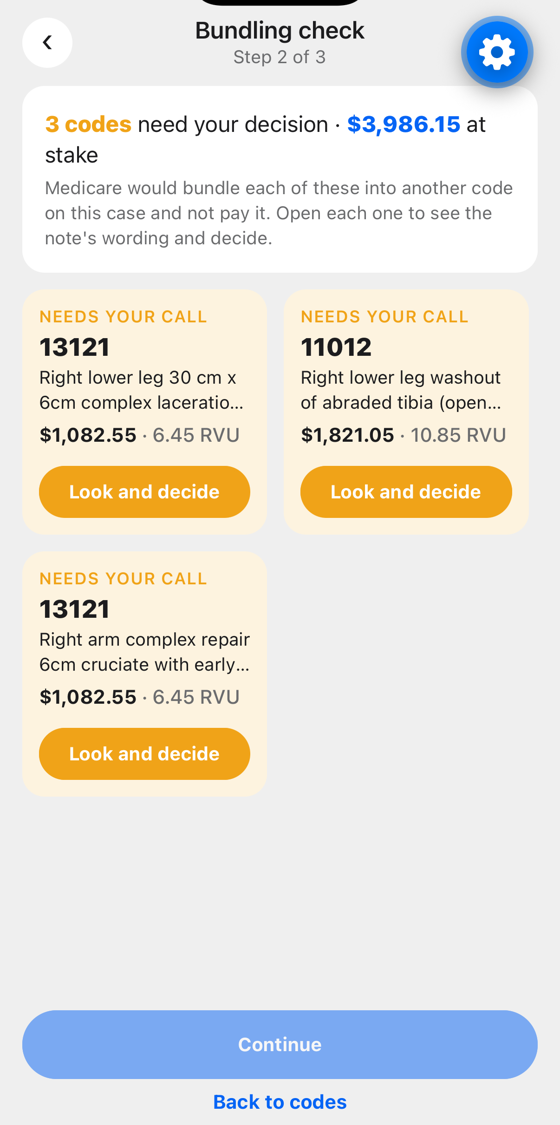
Bundling check, before billing sees it

Medicare's NCCI rules say which code pairs won't be paid together on the same day. The app checks every pair on the case against the current quarter's edits and flags the ones at stake — with the dollar amount.

  • Open a flagged code to see exactly which codes it would be bundled into, side by side, with your note's wording for each.
  • The AI reads both sides and recommends: separate site (XS), separate session (XE), remove the code, or "the note doesn't settle it." You decide with one tap; nothing is applied for you.
Bundling check: three codes flagged with the amount at stake

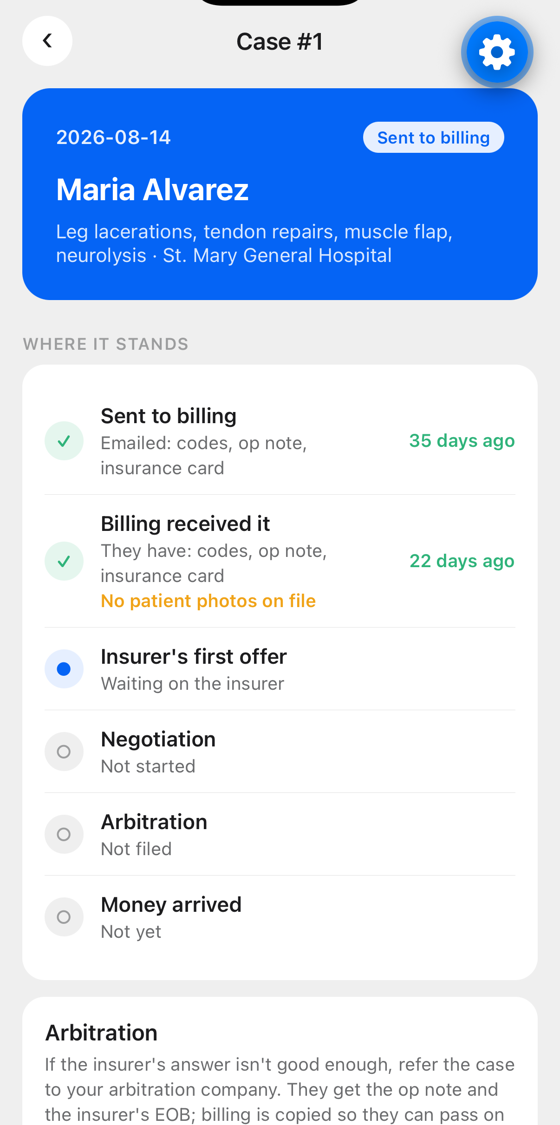
Where it stands

Every case has a plain timeline: sent to billing, what they've confirmed receiving, the insurer's first answer, negotiation, arbitration, money arrived. Days counted, so a won claim sitting unpaid is obvious.

  • Replies from billing are read and filed to the right case automatically. If they ask for the insurance card or a clearer page, it's sent for them. If they need a decision from you, it arrives as a one-tap question.
  • Quiet stretches get a polite check-in, timed to the insurer's clock — 35 days after filing, then every two weeks — never suggesting terms, only asking for status.
  • Going to arbitration? If your arbitration company is separate from your biller, the app asks billing for the EOB (or you photograph it), then sends the arbitrator the op note, the EOB, and an introduction — with billing copied.
A case's timeline: sent, received, waiting on the insurer

Surgeons you work with

Add colleagues by their Operative Note address. Put up to three on a case; they see it read-only, and each sees exactly which lines are theirs to bill, priced at their own multiplier.

Companies, not inboxes

Name your billing company and its contacts; name your arbitration company, or mark one company as both. Pick which company gets a case when you send; everyone there gets the email.

Partial notes are fine

Sent before the last page was dictated? Add the pages, read again, and send an update — it goes into the same email thread and says plainly what changed.

Your data, your account

Password sign-in with reset by email code. Delete your account and everything with it from the Profile screen, any time.

How the email works

Each surgeon gets an address like drjohnsmith@operativenote.com. Your billing company sees your name on every message and replies as they always have — no portal, no new login for them. Their replies come back to the right case by the email's own thread headers, so it works with any mail system.

We send only to the contacts you enter, only about your own cases, and only transactional mail: surgery packages, answers to their questions, and occasional status check-ins. There are no newsletters and no marketing. Every email the app sends on your behalf is visible on the case, word for word.

Example subject line: Maria Alvarez · St. Mary General Hospital · August 14, 2026 — surgery package from Dr. John Smith [ON-12]
Example code line: 1. CPT 27301-XS — $2,437.00 · Incision and drainage, deep abscess, bursa, or hematoma, thigh or knee region

Questions

Does the AI decide the codes?

No. It proposes codes with the evidence for each; you approve, swap, or remove them. It never applies a modifier or resolves a bundling conflict on its own — it recommends, and shows you why, and you tap.

Where do the prices come from?

The current Medicare Physician Fee Schedule: facility RVUs × the national conversion factor, then × your billing multiplier, which you set once on your profile. The RVUs and Medicare rate are always shown alongside your amount.

What about NCCI and modifiers — which versions?

Modifier eligibility comes from Medicare's per-code payment indicators in the fee schedule. Bundling edits come from CMS's quarterly Practitioner PTP files; each quarter's file is loaded as it's published, and a surgery is judged by the rules in force on its date of service.

Who can see a case?

You, and any surgeon you invite onto it (they must accept). Invited surgeons see the case read-only. Your billing and arbitration companies see only the emails you send them. There is no shared database across surgeons.

Is this for every surgeon?

It's built for surgeons who take emergency call, bill out of network, and work with an outside billing company — plastic, hand, and trauma surgeons first. If that's you, ask about the beta.

Private beta

iPhone, via TestFlight. To ask about access, write to us.

hello@operativenote.com

Screens show example data only. Names, cases, amounts, and companies are illustrative.